
The Commerce Bid Check API helps commerce partners make smarter routing decisions before traffic is sent.
With a single API call, partners can request a real-time Sovrn bid for a destination URL, evaluate that bid within their own routing logic, and decide whether Sovrn is the best place to send the click.
Instead of routing traffic first and measuring performance after the fact, Bid Check gives partners live bid data they can act on immediately. This helps partners understand the value of each click, compare monetization opportunities, enforce bid floors, and route traffic based on their own rules.
Bid Check is built for partners who want Sovrn to bid on the click, not automatically route the click. If you want Sovrn to manage routing and centralize performance and revenue reporting for you, Link Optimization is likely the better fit.
Who Bid Check is for
Bid Check is built for partners who manage their own routing logic or compare multiple monetization options before sending traffic, including:
-
Publishers and creators with direct affiliate relationships
-
BNPLs and shopping platforms comparing merchant offers
-
Coupon and deal sites optimizing high-volume outbound clicks
-
AI search, AI chat, and shopping assistants recommending products
-
Apps and commerce experiences routing traffic across multiple networks
When to use Bid Check
Use Bid Check when you need to evaluate Sovrn’s offer before deciding where to route a click.
Bid Check is best for partners who:
-
Manage their own routing logic
-
Compare Sovrn against other affiliate networks or monetization paths
-
Want to set minimum acceptable bid thresholds
-
Need click-level control over where traffic is sent
-
Want to compare CPC bids and, optionally, CPA offers in the same decision flow
-
Want Sovrn to compete for clicks without taking over routing decisions
Bid Check fits into your existing redirect flow, routing system, or commerce experience. You decide when Sovrn wins and only send traffic through Sovrn when the bid meets your rules.
Key benefits
Know the value of every click
Bid Check returns a live bid for a destination URL before the click is sent. This lets partners see Sovrn’s offer in real time and decide whether to route the click through Sovrn.
Skip the EPC testing cycle
Partners no longer need to route traffic first and wait for EPC data to build over time. Bid Check replaces guesswork with live bid data, helping partners make routing decisions immediately.
Compare CPC and CPA in one decision
Bid Check can evaluate real-time CPC bids and CPA offers together when includeCpa=true, giving partners a clearer view of monetization opportunities across pricing models.
Set bid floors to protect click value
Partners can set a minimum acceptable bid using bidFloor. If Sovrn’s available bid does not meet the submitted threshold, the API returns affiliated: false.
Route on your terms
Bid Check fits into the partner’s existing redirect flow, routing system, or commerce experience. Partners decide when Sovrn wins and only send traffic through Sovrn when it meets their rules.
How the Bid Check API works
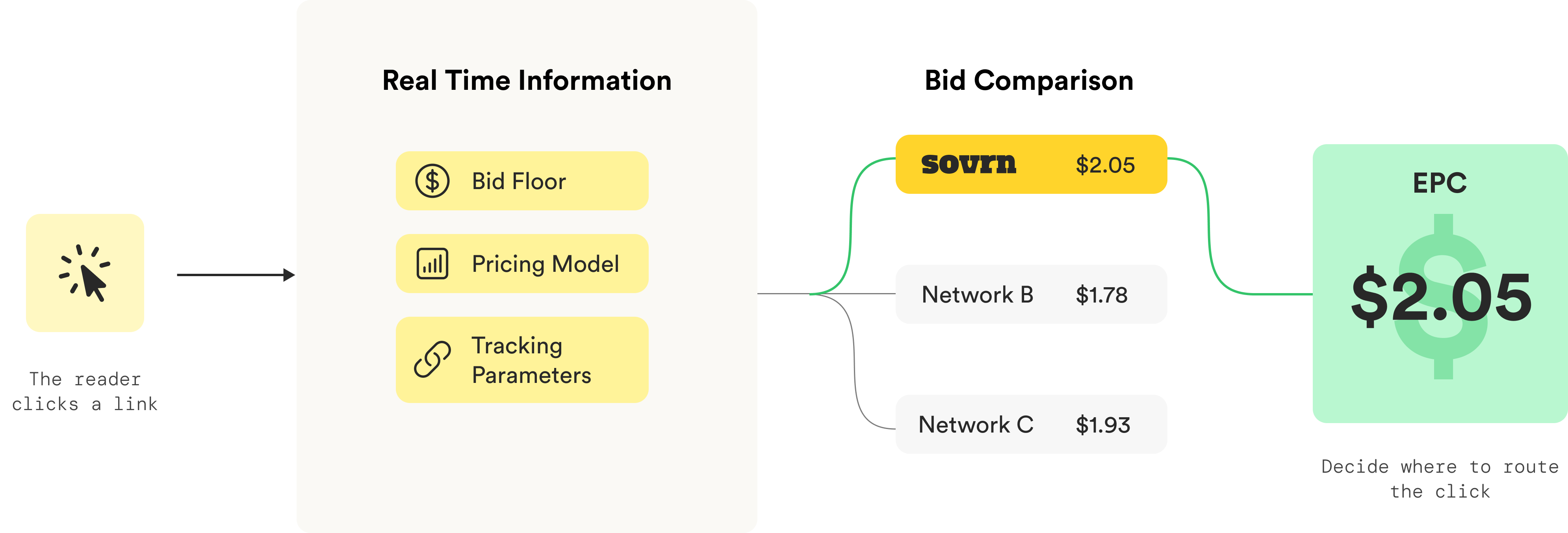
-
A user clicks a link.
-
You call the Bid Check API with the destination URL, the user’s IP address, the user’s user-agent string, and any optional tracking or consent parameters.
-
Sovrn evaluates the click and returns a real-time bid when one is available.
-
You compare Sovrn’s bid against other network offers or internal routing rules.
-
If Sovrn wins, you redirect the user’s browser to the returned Sovrn URL.
For CPC bids, the returned bid is valid for a limited time (250 ms). If the user is redirected through Sovrn before the bid expires, the returned eepc is guaranteed for that click.
eepc = estimated earnings per click
If the user is redirected after the bid expires, the click may still track and pay out, but it will use the standard link-optimization market rate rather than the quoted bid.
Endpoint
GET https://api.viglink.com/api/bid
Bid Check should be used during the click redirect flow.
Authentication
Every request must include your site’s Commerce API Key using the key query parameter.
This is the public Commerce API Key tied to the specific site, app, or traffic source sending the click. It is not the Secret Key used by other Sovrn Commerce APIs that authenticate with the Authorization header.
You can find your Commerce API Key in the Sovrn Platform under Commerce Settings > Sites. It can also be retrieved through the Campaign API.
Required parameters
|
Parameter |
Type |
Description |
|---|---|---|
|
|
string |
Site Commerce API Key for the site, app, or traffic source where the click originated. |
|
|
string |
Destination URL for the click. Must be URL-encoded when placed in the query string. |
|
|
string |
The real end user’s IP address. IPv4 and IPv6 are supported. |
|
|
string |
The real end user’s browser user-agent string. Must be URL-encoded when placed in the query string. |
The ip and userAgent values must reflect the actual end user who will be redirected through Sovrn. Do not pass the IP address or user-agent of your server. The bid is only valid for the user who is ultimately redirected.
Optional parameters
|
Parameter |
Type |
Description |
|---|---|---|
|
|
string |
Page URL where the click originated. Must be URL-encoded when placed in the query string. |
|
|
string |
Fully qualified URL used to associate the click with a child campaign, placement, domain, or publisher. Must be URL-encoded when placed in the query string. |
|
|
number |
Minimum acceptable bid in USD. Bids below this value return |
|
|
boolean |
When |
|
|
boolean |
Indicates whether GDPR applies to the user. If omitted, Sovrn determines applicability based on the user’s IP address. |
|
|
string |
GDPR consent string, when applicable. |
|
|
string |
CCPA consent string, when applicable. |
|
|
string |
GPP consent string, when applicable. |
Optional tracking parameters
Use optional tracking parameters to tag clicks by user, page, campaign, placement, user segment, or content.
|
Parameter |
Description |
|---|---|
|
|
Custom identifier used to associate the click with a user, page, campaign, or event. |
|
|
Identifies the source of the traffic, such as |
|
|
Identifies the marketing medium, such as |
|
|
Identifies the campaign name, promotion, or initiative. |
|
|
Identifies paid search keywords or targeting terms. |
|
|
Differentiates similar links or placements on the same page, such as |
URL encoding
Some query parameter values must be URL-encoded before being sent.
|
Parameter |
Why encoding is needed |
|---|---|
|
|
Contains characters such as |
|
|
Contains characters such as spaces, |
|
|
Contains characters such as |
|
|
Passed as a fully qualified URL and may contain characters such as |
Most HTTP clients handle encoding automatically. If you build the request URL manually, encode these values before sending the request.
Example request
curl "https://api.viglink.com/api/bid\
?key=YOUR_API_KEY\
&out=https%3A%2F%2Fexample-merchant.com\
&ip=192.0.2.1\
&userAgent=Mozilla%2F5.0...\
&bidFloor=0.01\
&includeCpa=false"
Example response: winning bid
{
  "affiliated": true,
  "pricing": "CPC",
  "eepc": 0.05725,
  "url": "https://redirect.viglink.com?u=...",
  "expireInMs": 250
}
Response fields
|
Field |
Description |
|---|---|
|
|
Returns |
|
|
Returns |
|
|
Expected earnings per click, in USD. This value is returned after Sovrn’s revenue share has already been deducted. |
|
|
Sovrn redirect URL to use if you route the click through Sovrn. |
|
|
Length of time the returned CPC bid is valid, in milliseconds. |
For CPC bids, eepc is the rate earned when the user is redirected through Sovrn before the bid expires.
For CPA offers, eepc is the average amount Sovrn expects the partner to earn per click. CPA eepc is an estimate and is not guaranteed for an individual click.
Redirecting the user
When the Bid Check API returns a winning bid, redirect the user’s browser to the returned url. This is typically done with an HTTP 302 redirect.
The redirect must happen from the real user’s browser so Sovrn receives the click from the actual user. Do not request the returned url from your server or follow the redirect server-side. Server-side redirects are not supported and will invalidate the bid.
Example response: no bid
{
  "affiliated": false
}
Sovrn returns affiliated: false when:
-
There is no eligible bid
-
The destination URL is not monetizable
-
The available bid is below the submitted
bidFloor
Status codes
|
Status code |
Meaning |
|---|---|
|
|
Success. Bid response returned. |
|
|
Bad Request. One or more required fields are missing or malformed. |
|
|
Unauthorized. The provided |
|
|
Internal Server Error. |
Best practices
To get the most accurate bid response and avoid invalidating the bid:
-
Pass the reader’s
ipanduserAgent, not your server’s values -
Use the Commerce API Key for the site, app, or traffic source where the click originated
-
URL-encode
out,userAgent,referrerUrl, andsubIdwhen building request URLs manually -
Use
bidFloorwhen you only want Sovrn to win clicks above a minimum value -
Use
includeCpa=truewhen you want CPA offers evaluated alongside CPC bids -
Redirect the user’s browser to the returned
urlimmediately when Sovrn wins -
Do not follow the returned redirect URL from your server